
How the Infiknit AI Canvas agent works
Understand how Infiknit’s canvas agent inspects, connects, and queues work with visible validation and human approval across creative projects.
 Jules AveryCanvas Practice Editor
An AI creative canvas agent works by turning a specific request into visible canvas operations: it can inspect the current project, create or update supported nodes, connect compatible inputs, and queue eligible work. In Infiknit, the agent is not the hidden owner of a project. The canvas stays visible, the application validates proposed operations, and the creator reviews the resulting nodes and media before using them.
That distinction matters. “Make me a campaign” is an ambiguous creative brief, not a safe operation. “Create an image node named product close-up, attach this approved product reference, and do not generate yet” is a bounded request whose result can be inspected. The agent is useful because it reduces setup and keeps the setup in the same place as the outcome.
Short answer: Give the agent one visible canvas task with an object, an action, and a boundary. It can inspect the project, create or update supported nodes, connect compatible references, and queue an eligible target. Check the proposed graph and settings before spending provider credits, then review the returned media yourself. The canvas records the operation; it does not make a model's output, claim, or publication decision automatic.
What should an agent request include?
Name the target node, the input that must remain fixed, the single change under test, and whether the agent may queue work. “Create a vertical image candidate from the approved product reference; do not queue” is complete enough to inspect. “Make a great campaign” leaves the agent to invent the source, acceptance rule, and spend boundary. A bounded request is easier to approve and easier to repair when validation returns an error.
The agent is a canvas operator, not a one-click producer
Infiknit is built around typed nodes and connections. The product documentation describes nodes for text, image, video, audio, video editing and trimming, plus reusable references such as Style, Character, Product and Background. Node settings include the prompt, selected image or video model, supported aspect ratio and resolution controls, video duration, reference fields and generation-input snapshots.
The agent receives a compact picture of that working state rather than treating a chat message as the whole project. It can use that context to make a structured request such as creating a node, changing a title or prompt, connecting a reference, or adding an eligible node to the queue. The frontend remains the source of truth for the live canvas. A model does not directly mutate the interface or quietly replace a creator’s work.
For creators, this means the useful question is not “is the agent autonomous?” Ask instead:
- What did it read before acting?
- Which exact nodes and edges did it propose or change?
- Which settings were validated against the available model?
- Did it only prepare work, or did it queue paid provider work?
- What must a person still approve?
Those questions make the agent understandable when it helps and diagnosable when it does not.
What the agent can do today
The internal canvas-operation design separates actions into small concepts: create nodes, update nodes, connect or disconnect nodes, delete nodes, read image nodes and queue nodes. A create request can create more than one node as one validated transaction, so a text instruction and its image target do not appear as a half-built setup if validation fails. Updates are limited to fields appropriate to the node: for example, titles, prompts, model selections, aspect ratio, resolution, duration, trim values and supported reference settings.
Connections are also meaningful operations. A creator might ask the agent to attach an approved Product reference to an Image node, connect an accepted image to a Video node, or keep a Style reference available for an alternate image branch. Each connection has a role such as prompt, image, video, style, character, product, background or camera angle. The point is not to draw decorative lines. It is to make an input and its intended role inspectable.
The agent can read supported image nodes when visual understanding is actually required. It should not receive an unlimited dump of private media URLs or assume that a thumbnail proves a result is correct. If a visual evaluation matters—for example, whether package text still reads or whether a character drifted—a human should inspect the output at usable size too.
Queueing is deliberately different from creating. A queue action requests execution; it does not return finished media synchronously. Depending on the implementation state and the selected model, the node may move through queued, loading, success or error states. The agent can report that a target was queued, but a creator still needs to review the actual output and any provider error.
A practical request sequence
Suppose you have an approved product image and want to prepare a short product-motion test. A careful sequence is smaller than a vague “make a video” request.
- State the acceptance condition. For example: the label, cap shape and brand colors must remain recognizable; the camera may move slowly; no voiceover is required.
- Ask for setup, not execution. Create an Image or Video node with a descriptive title and the desired prompt. Attach the approved product reference using the product or image input the selected model supports.
- Inspect the canvas. Confirm that the source is the correct one, the target node is named clearly, and no accidental connection has been made from an experiment.
- Check model affordances. Model availability, input modes, allowed reference types, duration, resolution and aspect ratio are provider-specific. A model name is not enough evidence that a particular connection will work.
- Queue only the intended target. This matters for time and cost. The agent should not start unrelated branches merely because they are nearby on the canvas.
- Review the returned media. Check identity, packaging, legibility, movement and unwanted changes. If the asset is not acceptable, preserve the failed branch long enough to explain the next correction.
- Promote a result deliberately. Connect an accepted output to the next step or save it as a reusable reference only after a human has reviewed it.
This pattern is equally useful for a static image, a video starting from a still, or a more elaborate project. It creates a record of why an output exists instead of forcing the next creator to guess.
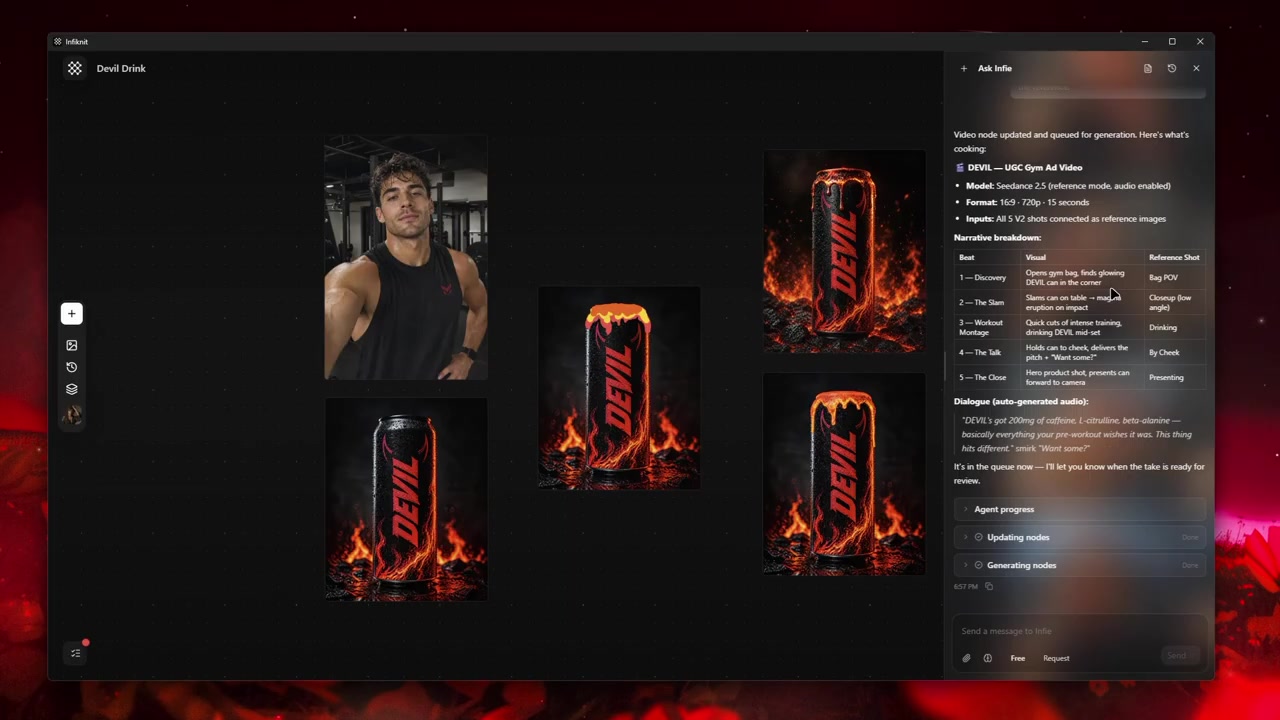
A visible canvas record gives an agent and its reviewer concrete project context to work from.
Where validation protects a project
Validation is not a marketing word here; it is what prevents an agent from translating natural language into an invalid graph mutation. The documented operation layer validates supported node types, allowed settings and compatible connections. Reference nodes must resolve to available library assets. Invalid requests should return useful alternatives rather than leave unseen damage in a project.
There are several practical benefits:
- A Text node cannot be used as an arbitrary target just because a prompt says to connect it.
- A reference is connected in an explicit role instead of being silently blended into an unspecified prompt.
- A model-specific setting is checked against the product’s capability payload rather than copied from a different provider.
- A delete operation can be treated more carefully when successful output nodes are involved.
- Expensive queue requests can be visible to the user before they run.
Creators should still read error messages. An error is often a useful boundary: the selected model may not accept the input, a node may be in the wrong role, or the instruction may be asking for a capability that is not currently exposed. The correct response is to fix the earliest invalid assumption, not keep adding prompt text.
What the agent should not promise
An honest agent does not promise a finished campaign from one broad instruction. It does not guarantee that a provider will preserve a product, face, logo, text treatment or motion detail. It also does not turn an unsupported connection into a supported one, make a failed upstream asset acceptable, or decide whether a claim is legally safe to publish.
Current product planning also distinguishes queueing a target from executing an entire dependency graph. The operation contract has described dependency-graph execution as a future queue capability rather than something the agent should imply exists everywhere today. If several nodes depend on each other, confirm the actual queue behavior in the application instead of assuming that selecting the final node will run every upstream step in order.
Human review remains necessary for:
- ownership and permission to use a reference;
- factual and brand claims inside a creative asset;
- provider cost and model choice;
- visual quality, especially faces, products, text and logos;
- whether an output is approved for a campaign or client delivery;
- whether a reusable asset should replace an older approved version.
The agent can make those reviews faster by keeping the relevant evidence on the canvas. It cannot make them disappear.
A review method that catches useful failures
After every material agent action, review in three passes. First, review the graph: are the intended nodes present, named and connected in the expected direction? Second, review the settings: is the model, reference, aspect ratio, duration or trim range the one you intended? Third, review the output: does the actual media satisfy the acceptance condition?
Use a simple record for a branch that matters:
| Record | Example |
|---|---|
| Goal | Vertical product motion test with recognisable packaging |
| Stable inputs | Approved product image and brand background |
| Variable | Camera movement and motion prompt |
| Tool action | Created Video node and connected product reference |
| Result | Queued, then reviewed by creator |
| Decision | Keep as a candidate, revise, or retire |
The record does not need to become paperwork for every experiment. It is most valuable when work will be reused, handed off, billed, or used as evidence for a later decision.
How to write better requests for a creative agent
Good requests give the agent an object, an action and a boundary. “Read the selected image node and suggest a clearer title” is bounded. “Create two alternative image nodes from the approved product reference; do not queue them” is bounded. “Connect the selected approved still to the existing video node only if that node accepts image input” is bounded.
Avoid requests that collapse several approval decisions into one sentence. “Build, generate, choose the best, edit it and publish it” asks the system to invent criteria, spend provider credits and make a publication decision. Break it into setup, generation and approval. This also makes it easier to compare outputs and to learn which change improved a result.
For broader workflow design, see the complete guide to an AI creative canvas, how to connect generation nodes, and image-generation graphs. If your next step is motion, use the video graph guide and creating AI video from reference images. For durable work, reusable creative Blueprints explain what to save after a process has proved useful.
FAQ
Can the agent generate a complete campaign on its own?
No. It can help construct and queue supported canvas work, but the creator should define the brief, review the results, approve spending and decide what may be published. A canvas action succeeding is not proof that a campaign is accurate, on-brand or cleared for use.
Does queueing mean the output is finished?
No. Queueing is a request to execute an eligible node. Provider work can take time or fail, and a successful technical result can still be creatively wrong. Review the node state and the produced media.
Why keep failed branches?
They show which input, model setting or reference strategy did not meet the acceptance condition. Keep failures that explain a correction; delete obvious clutter once they no longer provide useful history.
What makes an agent action trustworthy?
The action should be visible, bounded, validated and reviewable. You should be able to identify the request, the changed nodes, the connected inputs, the queue state and the human decision that followed.