INFIKNIT
Infiknit Blog
Guides and journal notes for Infiknit's AI canvas, with practical how-tos on image, video, and prompt workflows for creators and teams.
Iterative AI image creation on a visual canvas
. Improve Infiknit AI images one controlled change at a time with references, branches, and reviewable decisions for repeatable image work.Updated August 14, 2026Plan creator-style short-form videos with AI
. Plan short-form creator videos in Infiknit with briefs, source media, distinct beats, and reviewable image-to-video branches.Updated August 17, 2026AI filmmaking from planning to final shot
. Plan Infiknit AI film shots from storyboards and references through reviewable frames, clips, trims, and final decisions.Updated August 14, 2026AI media editing for images and video
. Edit AI images and video in Infiknit by connecting the source, intended change, candidate, and review decision for cleaner revisions.Updated August 14, 2026AI content creation for ecommerce
. Create accurate ecommerce images, product videos, and creator assets in Infiknit with product references and reviewable branches.Updated August 14, 2026AI visual content creation for marketing campaigns
. Plan Infiknit campaign images, videos, and creator concepts with sources, deliverables, formats, and reviewable decisions.Updated August 17, 2026Best AI platforms for image and video creation
. Compare AI image and video platforms by canvas structure, references, model choice, review, handoff, and supported creative jobs.Updated August 14, 2026Best AI product image generation methods
. Choose Infiknit AI product-image methods that protect geometry, labels, scale, crops, and approved claims for dependable outputs.Updated August 14, 2026Best AI video trimming and extension methods
. Choose Infiknit AI video trims and extensions by preserving useful moments, clean joins, and reviewed source clips across short-form projects.Updated August 14, 2026Best desktop AI creative tools with BYOK control
. Compare desktop AI creative tools with BYOK by checking project state, provider keys, privacy, model choice, and handoff.Updated August 14, 2026Best methods for consistent batch AI images
. Create consistent Infiknit AI image batches by fixing identity and style while varying one presentation choice for repeatable sets.Updated August 14, 2026Reusable AI character references for video
. Build reusable Infiknit character references that preserve identity across poses, scenes, and short-form video with clearer review.Updated August 14, 2026Evaluate AI generation cost and quality
. Evaluate AI image and video cost in Infiknit by holding inputs constant and measuring failures, review, and reuse for decisions.Updated August 14, 2026Build an AI audio and multimodal creative canvas
. Coordinate narration, music, captions, images, and video in an Infiknit multimodal canvas with timing and review for reliable delivery.Updated August 17, 2026Build an AI brand visual consistency system
. Build an Infiknit brand consistency system with versioned references, product truth, drift checks, and reviewable branches.Updated August 17, 2026Build node-based image graphs in Infiknit
. Build Infiknit AI image graphs with approved references, focused experiments, review gates, and reusable decisions for repeatable projects.Updated August 17, 2026Build node-based video graphs in Infiknit
. Build reviewable Infiknit AI video graphs with shot briefs, references, motion, continuity checks, trims, and handoffs for dependable production.Updated August 17, 2026Build reusable AI creative Blueprints
. Build reusable Infiknit Blueprints from approved canvas structures with explicit inputs, references, review gates, and reuse limits.Updated August 14, 2026Connect generation nodes on the Infiknit AI Canvas
. Connect source, reference, image, and video nodes in Infiknit without hiding dependencies or overcomplicating the canvas.Updated August 14, 2026Continue and extend an AI video scene
. Continue Infiknit AI video scene with an approved reference frame, matched motion, and a reviewed transition for its next shot.Updated August 14, 2026Control first and last frames in AI video
. Use first and last frame references in Infiknit to control video movement, continuity, and extension decisions before final export.Updated August 14, 2026Create a consistent AI character for video
. Create consistent AI character shots in Infiknit by approving identity references before changing pose, setting, or motion.Updated August 14, 2026Create AI video from reference images
. Create short Infiknit AI video shots from reference images by separating identity, motion, framing, and review for controlled continuity.Updated August 14, 2026Create consistent AI product photography
. Keep AI product shots consistent across scenes and crops. Use an approved reference, separate lighting from product identity, and check labels before reuse.Updated September 11, 2026Create images, video, and audio in one AI studio
. Keep Infiknit images, video, audio, references, and review decisions together in one creative canvas for connected production.Updated August 14, 2026Create reusable brand backgrounds and references
. Create reusable Infiknit brand backgrounds and references with approval notes, controlled variants, and a clear source of truth.Updated August 14, 2026Create social media images and videos with AI
. Plan Infiknit social images and short videos with audience intent, source references, framing, and reviewable branches for channel-ready content.Updated August 17, 2026Create UGC-style product videos with AI
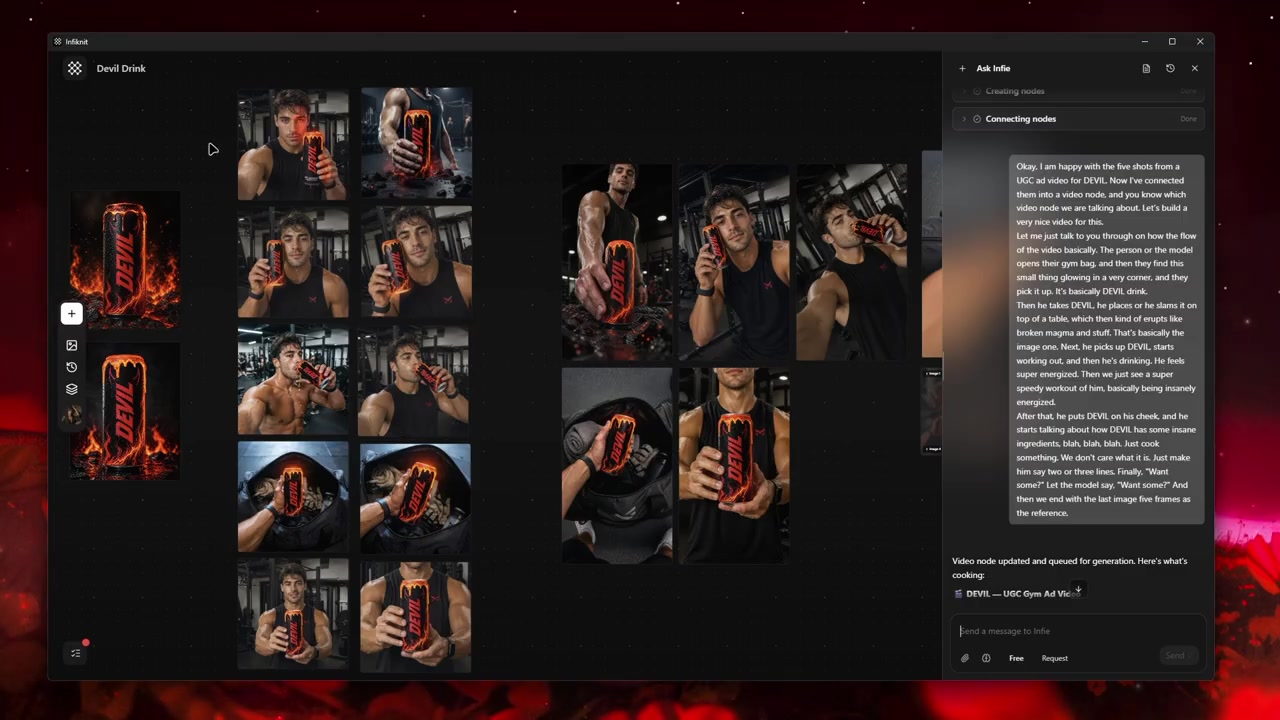
. Build a reviewed UGC-style product video in Infiknit with references, image selection, image-to-video generation, and clear visual checks.Updated August 17, 2026Edit generated images with references and masks
. Edit Infiknit images by isolating one change, preserving the approved source, and reviewing the edited branch before reuse.Updated August 14, 2026Extract, freeze, and reuse frames from video
. Extract, review, and reuse video frames in Infiknit as references for later image or video decisions for controlled iteration.Updated August 14, 2026Generate image variations from reference images
. Generate controlled Infiknit image variations by preserving the reference and changing one visual decision at a time for repeatable content.Updated August 14, 2026How AI character consistency works
. Keep Infiknit AI characters recognizable by separating identity references from presentation choices across poses and scenes.Updated August 14, 2026How the Infiknit AI Canvas agent works
. Understand how Infiknit’s canvas agent inspects, connects, and queues work with visible validation and human approval across creative projects.Updated August 17, 2026Infiknit AI Canvas: complete guide
. Use an Infiknit AI canvas to define outcomes, connect evidence, generate deliberately, and preserve reusable decisions for consistent production.Updated August 14, 2026Infiknit vs Adobe Firefly for ad image variations
. Compare Infiknit and Adobe Firefly for product-led ad image variations, including references, canvas branches, model choice, reuse, and handoff.Updated August 14, 2026Infiknit vs Artificial Studio for style references
. Compare Infiknit and Artificial Studio for style references, visual consistency, model choice, canvas review, reusable assets, and project handoff.Updated August 14, 2026Infiknit vs Canva AI for visual media creation
. Compare Infiknit and Canva AI for visual media: templates, references, model access, canvas review, reusable branches, and export handoff.Updated August 14, 2026Infiknit vs ComfyUI for node-based creation
. Compare Infiknit and ComfyUI for node-based image creation, model control, references, local setup, reviewable branches, reuse, and handoff.Updated August 14, 2026Infiknit vs Creatify for ad creative production
. Compare Infiknit and Creatify for ad creative production, product references, UGC video concepts, model access, reviewable branches, reuse, and export.Updated August 14, 2026Infiknit vs Figma Weave for multi-model creation
. Compare Infiknit and Figma Weave for multi-model creation, canvas structure, model access, references, reviewable branches, reusable assets, and handoff.Updated August 14, 2026Infiknit vs Flora for visual node workflows
. Compare Infiknit and FLORA for visual node creation, agent-assisted connections, model choice, references, reviewable branches, reuse, and handoff.Updated August 14, 2026Infiknit vs FlowMuse for agent-assisted creation
. Compare Infiknit and FlowMuse for agent-assisted media creation, canvas control, model routing, references, reviewable branches, reuse, and handoff.Updated August 14, 2026Infiknit vs Higgsfield for AI video creation
. Compare Infiknit and Higgsfield for AI video creation, motion controls, references, model choice, reviewable branches, reuse, and export handoff.Updated August 14, 2026Infiknit vs Krea for AI image workflows
. Compare Infiknit and Krea for AI image creation, real-time iteration, references, model choice, reviewable branches, reuse, and export.Updated August 14, 2026Infiknit vs Luma for creative agent workflows
. Compare Infiknit and Luma for creative agent work, image and video generation, references, canvas review, model access, reuse, and handoff.Updated August 14, 2026Infiknit vs MoodNode for BYOK image and video
. Compare Infiknit and MoodNode for BYOK image and video creation, provider keys, model access, references, reviewable branches, reuse, and handoff.Updated August 14, 2026Infiknit vs NodeTool for local BYOK workflows
. Compare Infiknit and NodeTool for local BYOK creation, model hosting, provider keys, node control, references, reproducibility, and team handoff.Updated August 14, 2026Infiknit vs Runway for AI filmmaking workflows
. Compare Infiknit and Runway for AI filmmaking, motion control, reference handling, model access, reviewable branches, reuse, and export.Updated August 14, 2026Keep a product consistent across UGC variations
. Create UGC variations with a reference-led method that preserves product shape, labels, materials, and approved identity.Updated August 14, 2026Keep the same AI character across poses
. Keep an AI character recognizable across Infiknit poses and scenes with an approved reference and one controlled change.Updated August 14, 2026Local-first BYOK AI creation explained
. Understand local-first BYOK creation in Infiknit, including desktop context, remote providers, and project preservation.Updated August 14, 2026Organize a reusable AI creative asset library
. Organize Infiknit AI assets with named references, approval status, source context, and reuse notes for future projects.Updated August 14, 2026Remix images with multiple style references
. Remix Infiknit images with separate product, character, style, and setting references while keeping each decision reviewable.Updated August 14, 2026Repurpose one product idea into social assets
. Turn one approved product idea into coordinated image, video, caption, and audio assets in an Infiknit canvas for repeatable campaigns.Updated August 17, 2026Storyboard a UGC video before generation
. Create a reviewable UGC storyboard before AI generation by defining proof, shots, transitions, and product constraints for cleaner production.Updated August 17, 2026Turn a storyboard into consistent AI video scenes
. Turn storyboards into reviewable Infiknit AI video scenes while preserving shot order, references, frames, and continuity notes.Updated August 14, 2026Turn product images into AI product videos
. Turn one approved product image into a reviewable Infiknit product video without losing geometry, claims, or source context.Updated August 14, 2026UGC ad hooks and creative variations
. Build controlled UGC ad-hook variations around one approved proof moment while preserving the creative record for repeatable testing.Updated August 17, 2026Create a UGC product demo from a product image
. Plan an AI-assisted UGC product demonstration from an approved image with visible proof and reviewable decisions for short-form content.Updated August 17, 2026Develop AI UGC testimonial video concepts
. Develop testimonial-style video concepts from approved product facts, visual references, and human review for short-form campaigns.Updated August 17, 2026Use multiple AI models in one creative platform
. Compare AI models in Infiknit by keeping briefs, references, outputs, failures, and review criteria on one canvas for informed selection.Updated August 14, 2026AI content creation for images and video
. Create AI images and videos in Infiknit with connected references, reviewable branches, and reusable creative decisions.Updated August 14, 2026What is Infiknit's creative canvas?
Infiknit is an infinite visual canvas for creators, teams, and brands building image, video, and audio projects from connected creative decisions. Place a brief, reference image, prompt, generated still, video shot, or audio direction on the same surface so the source and the next decision stay visible together. The agentic assistant can help create, update, connect, and review eligible canvas nodes through the product’s available tools; you still choose what to keep and how it should be used. Project memory keeps the working context, references, outputs, and branches available as a project develops, so a later change does not have to start from an unexplained export. BYOK and provider access let you work with the model connections enabled for your account, subject to each provider’s supported inputs and limits. Start with one visual job, review the first candidate, then extend the accepted branch into motion, sound, or a reusable reference.
| Creative job | What stays together |
|---|---|
| Image creation | References, prompts, candidates, and selected edits |
| Video production | Frames, shot decisions, branches, and motion outputs |
| Product content | Product details, visual directions, and reusable assets |
| Model choice | Provider access, BYOK settings, and review context |
Start with the creative job
- Images: create, edit, and compare reference-led visual directions.
- Video: plan shots, preserve approved frames, and review motion before export.
- Product content: keep product details visible across campaign, ecommerce, and creator-style assets.
- Reusable systems: save the references and decisions a future project needs to pick up where this one ended.
See the canvas in action