
Build node-based image graphs in Infiknit
Build Infiknit AI image graphs with approved references, focused experiments, review gates, and reusable decisions for repeatable projects.
 Mira ParkVisual Systems Editor
A node-based AI image generation graph is useful when it makes an image decision repeatable. Build one around the source you trust, the one variable you want to test and the output you will actually review. In Infiknit, an image graph can keep prompts, approved product or character references, style direction, source assets and image candidates together on the same infinite canvas.
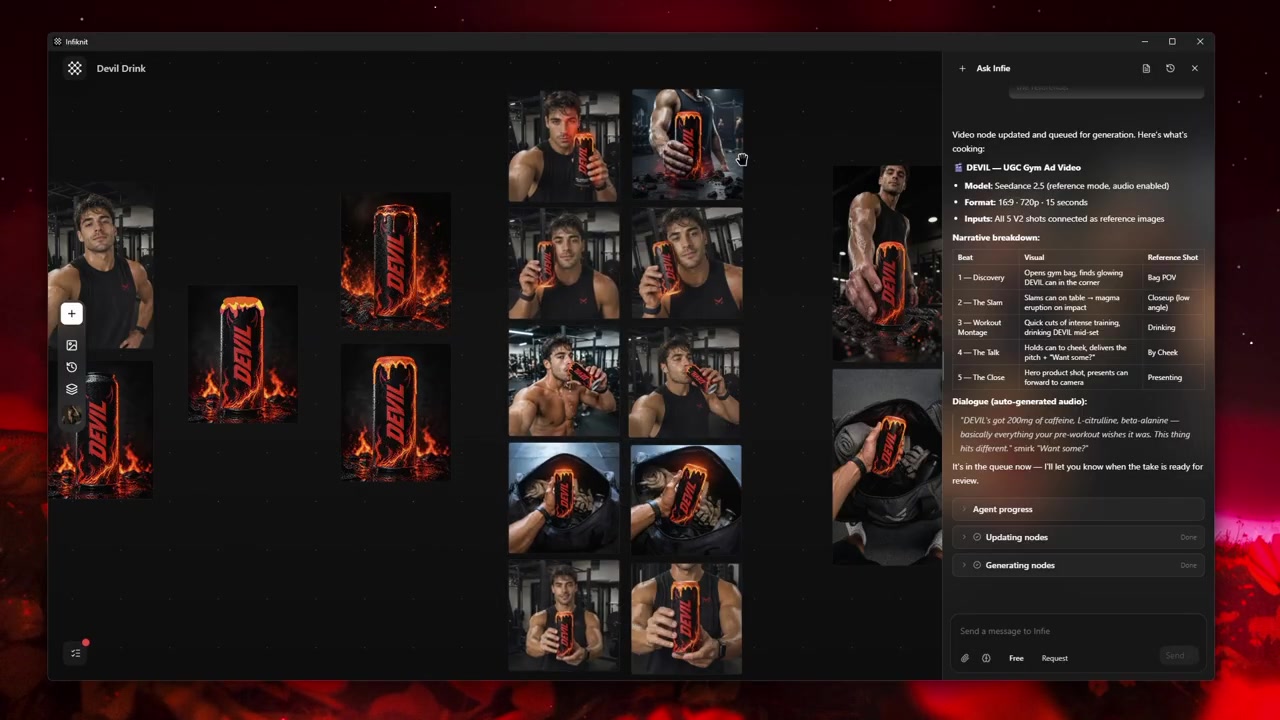
The source and candidate review an image graph should preserve.
Do not begin by building a complicated web of nodes. Begin with an image brief: what must remain recognisable, what can change and where will the image appear? A graph succeeds when a person can return later and understand why a candidate was generated—not when it has the most branches.
Short answer: Start with one approved source, one image brief, one deliberate variable, and one review gate. Add only the Text, Product/Character, Style/Background, Image, and decision nodes needed for that test. Check the selected model's input support before queueing, review the result at its delivery size, and connect only approved outputs to video or downstream edits.
When should an image graph branch?
Create a branch when you can name the question it answers: a different crop, scene, model, reference role, or placement. Do not branch merely to collect more candidates. A branch should inherit the approved source and change one major variable so the review can identify what caused an improvement or failure.
Choose the source of truth
Every image graph needs a source of truth. For a product image, that may be an approved packshot. For a recurring character, it may be a reviewed character reference. For a brand treatment, it may be an approved Style asset. Name the source precisely, including the version when that matters. A file labelled product-final will cause trouble when the packaging changes; citrus-can—approved July label preserves useful context.
Use a separate reference node when the item has a stable role across several images. Infiknit’s canvas includes Product, Character, Style and Background node types for reusable creative references, alongside Text and Image nodes. This separation lets you modify a scene without silently replacing the identity you were trying to retain.
Make a five-part image graph
A practical first graph has five parts:
- Brief: a Text node that says the intended audience, placement and acceptance condition.
- Identity: an approved Product or Character reference when recognisability matters.
- Direction: a Style or Background reference only when it provides a specific visual constraint.
- Candidate: an Image node with the model and settings appropriate to this test.
- Decision: an accepted output or a named rejected branch that explains the next correction.
The candidate node should have one job. Square product launch still—quiet kitchen gives reviewers a useful expectation. Try 7 does not. Keep the source and candidate near each other so the relationship is legible at a glance.
Design an experiment instead of a prompt pile
Change one important variable per branch. If the source is stable, test either scene, composition, style, model or aspect ratio—not all of them at once. When an output improves, you then know what likely helped. When it fails, you know where to look.
For example, a first branch may keep the same approved product reference while testing a wide countertop scene. A second branch may keep that source and scene but use a vertical crop. A third might replace the background reference while preserving the product and composition. Each branch answers a different question.
Avoid turning every reference into an input. A product reference is valuable when the product needs to stay recognisable. A background reference is valuable when the place itself matters. Adding unrelated images can obscure the request and make it impossible to explain which source should be repaired when a candidate drifts.
Check model capability before queueing
Image models do not share one universal input contract. Infiknit’s documented capability system exposes enabled image and video models through validated providers, including supported modes, aspect ratios, resolutions and reference-image support. Read the live controls for the selected model before assuming a reference mode or setting is available.
This is especially important for work involving product packaging, text, characters or several references. A graph can accurately represent your intent while the provider still produces an imperfect result. The graph is evidence and a way to isolate changes; it is not a consistency guarantee.
Review images as both output and input
Review the returned image at the size relevant to the decision. A thumbnail can conceal malformed labels, altered geometry, broken hands or unwanted details. Use a simple pass:
| Review question | What it catches |
|---|---|
| Is the stable identity still correct? | Product, face, logo or brand drift. |
| Does the composition serve the placement? | A usable crop versus an attractive but unusable image. |
| Are key details legible? | Packaging, text and small object failures. |
| Does the result match the declared variable? | Accidental changes to several dimensions at once. |
| Is it safe to reuse downstream? | Weak candidates entering video or template work. |
If the image will become a video input, review it more strictly. A composition that works as a still may leave no room for motion, and an imperfection can become more obvious once animated. Connect only approved outputs to downstream work. Create AI video from reference images explains that next step.
Preserve useful branches
Keep the accepted image as a stable branch and title it as approved. Keep a failure when it documents a real boundary—for example, a certain crop made the packaging unreadable. Delete visual clutter that does not explain a decision. The point is not to archive every output; it is to retain enough context to make future work faster and safer.
When a combination of sources, prompt, settings and review criteria has proved repeatable, it may be worth turning it into a reusable AI creative Blueprint. A Blueprint should record its required inputs and limitations, not turn an unreviewed image into a false guarantee.
An example: three product-image alternatives
Start with one approved product reference and a brief for a vertical launch placement. Branch one tests a clean studio background. Branch two preserves the product but tries a warmer home environment. Branch three preserves the studio setting while testing a different composition. Review each candidate for recognisability, crop and legibility. Select the strongest result, annotate why it passed and use it as the only input to the next video or edit step.
This graph makes it possible to identify whether a weak result came from the product source, the scene direction, the model or the placement. It does not conceal that uncertainty behind a generic instruction.
For the canvas basics, read AI creative canvas: Complete Guide. For input roles and edge hygiene, use connect generation nodes on a visual AI canvas. For keeping approved assets reusable, see organize a reusable AI creative asset library, build an AI brand visual consistency system and create reusable brand backgrounds and references.
Limits and common mistakes
Do not claim an image graph guarantees model fidelity. The model, provider availability and capability surface can change. Do not attach a source you lack permission to reuse. Do not call an output approved because it is technically successful. A human must still approve the visual result, factual claims and publication context.
The most common practical mistake is fixing every failure with a longer prompt. Trace the earliest uncertain input instead. If the product is wrong, inspect the product source or reference strategy. If the product is right but the scene is weak, adjust the scene branch. If the image is good but unsuitable for a video, create a distinct motion-ready still.
A handoff note for the next creator
Before leaving a graph, add one sentence beside the selected branch: what passed, what was deliberately left unchanged, and what should be tested next. For example: “Approved because the July package remains legible in a 9:16 crop; keep the same product reference for motion, but test a slower camera move.” That note protects the project from accidental reinvention. It also makes the graph useful when the creator who made it is not the creator who resumes it.
If a product, character or style is superseded, do not silently swap it inside an old successful branch. Add the new approved source, preserve the previous version and run a new candidate. That is slower than overwriting a label, but it keeps the evidence accurate and makes old results explainable.
Name the accepted state, not just the file
An approved image needs a short reason beside it. State the target placement, the source reference it preserves, and the detail that was inspected. “Selected for a vertical launch crop; product label and handle remain legible” is a decision another person can assess. “Final-v3” is not. This small naming habit also makes later asset searches more useful because the team can find a result by its intended use rather than relying on memory of an old session.
FAQ
How many image nodes should a graph have?
Use only enough nodes to preserve the decisions you expect to revisit. One source, one brief, a candidate and an accepted output can be enough for a simple task. Add branches when they represent an intentional alternative.
Should I save every generated image as an asset?
No. Save approved references and candidates with demonstrated reuse value. Experiments without context make an asset library harder to trust.
Can an agent build the graph for me?
An agent can help create, update and connect supported nodes through visible validated actions. You still need to define the brief, confirm inputs, review media and approve any queueing or publishing decision. See how an AI creative canvas agent works.