
Continue and extend an AI video scene
Continue Infiknit AI video scene with an approved reference frame, matched motion, and a reviewed transition for its next shot.
 Luca MarinAI Video Editor
An extension should begin from an approved moment, not simply the latest frame available. The new motion must respect the subject’s direction, camera position, lighting, and intended endpoint. Infiknit keeps the accepted frame, continuation brief, candidate, and review note connected on a canvas so the join can be inspected before the scene grows longer.
Extend AI video from last frame, video scene continuation, and AI shot extension share this page because each asks how to add time without losing continuity.
Short answer: Freeze or select an approved frame, then write the next action and endpoint. Keep the source clip, selected frame, continuation brief, and candidate on named Infiknit canvas nodes. Match the direction and scale of the original motion. Generate a short extension and inspect the join, the middle action, and the final frame. If the subject jumps, lighting changes, or an object drifts, repair the frame or split the scene at a clean cut. Do not extend an uncertain clip repeatedly. Preserve the accepted continuation and its source.
Which frame should start an AI scene continuation?
Answer in practice: Inspect the last reliable frame for subject position, gaze, hand placement, product geometry, and light direction. Select a frame that already passes those checks; the latest frame is not automatically the best frame. Write one next action and one endpoint. If a person is walking left, keep that direction unless the brief deliberately changes it. If a product is on a table, state whether the camera or product moves. Start with a short continuation and keep its source, brief, candidate, and review note together. Watch the join, the middle action, and the endpoint muted. If identity, scale, lighting, or screen direction changes, repair the frame or simplify the action. If the continuation still fails, use a cut between two accepted moments. A longer render cannot repair an uncertain starting frame; it only makes the defect harder to isolate.
What scene continuation solves
Continuation preserves a useful moment while adding time. The risk is that the new segment changes identity or direction at the join. Keeping the selected frame and continuation note visible lets the reviewer distinguish a source problem from a motion problem.
Extension or cut?
Extend when the subject and camera can plausibly continue. Cut when the action changes, the endpoint is uncertain, or the model cannot preserve a small but important detail. Two clean shots with a deliberate cut are often more useful than one long clip with a visible seam.
Before continuing, write a handoff note for the exact frame you will use: subject position, gaze or screen direction, camera height, light direction, and the next action. Keep identity constraints separate from presentation choices. The face, product geometry, wardrobe, and scene direction may need to stay fixed; crop, pace, and background detail may change. This prevents a continuation prompt from trying to solve several decisions at once.
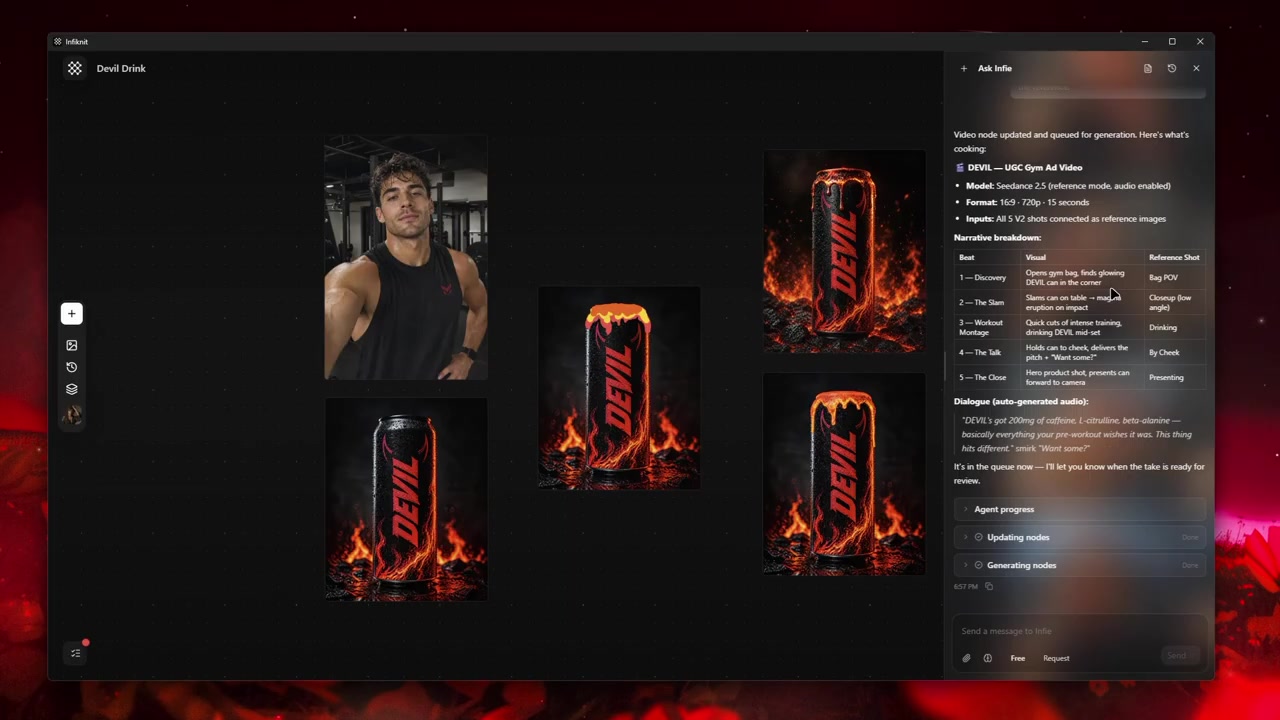
Build the smallest useful node graph
Use five named responsibilities: approved source frame, continuation brief, source clip, candidate extension, and reviewed handoff. Keep the source frame next to the brief so a reviewer can see what “continue” means. A graph is useful only when it distinguishes a frame chosen for continuity from a frame that merely happened to be last.
1. Select the approved frame
Choose a frame with clear identity, stable hands or product geometry, and enough room for the next movement. Avoid a frame taken during a blink, contact, whip-pan, or focus pull. Save the timestamp and explain why it is a safe handoff.
2. Write the next action and endpoint
Describe what moves, what stays fixed, and where the extension ends. “The runner continues left for two seconds, then stops under the arch” is testable. “Make it more cinematic” is not. Keep the continuation short enough to inspect before creating a longer branch.
3. Match the original motion
Record screen direction, camera movement, subject scale, and light direction from the source. If the camera was locked, do not add a dolly in the same continuation unless the brief calls for a deliberate transition. A smaller motion request gives the model fewer ways to invent a new scene.
4. Review the join before the middle
Watch the last second of the source and first second of the extension together. Then inspect the middle and final frames separately. Reject a candidate if the join passes but the subject changes later; a smooth seam cannot rescue a broken endpoint.
5. Keep a cut as the fallback branch
Save the short source and the extension as separate branches. If direction, lighting, or identity drifts, use two accepted shots with a clean cut. Do not keep extending an uncertain clip because it has already consumed provider time.
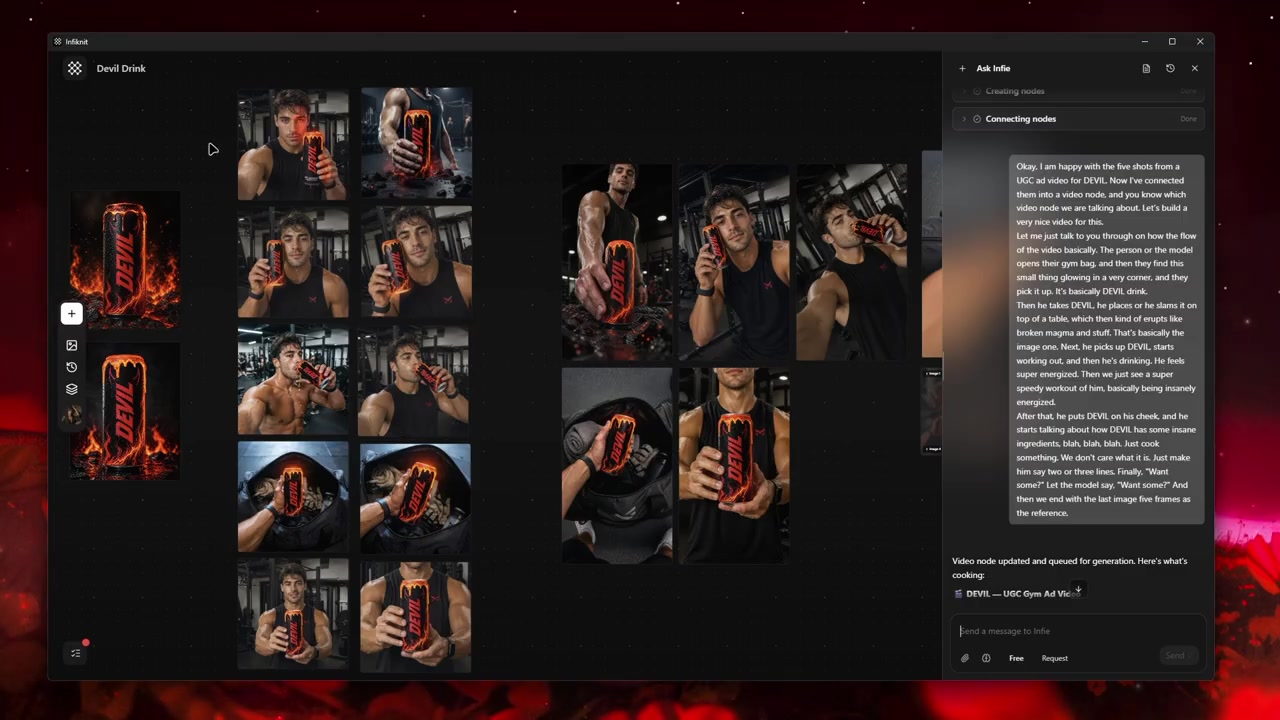
Decisions to record before generation
| Decision | Review question | Canvas evidence |
|---|---|---|
| Handoff frame | Is the subject stable and recognisable at the chosen timestamp? | Still, timestamp, and note naming the preserved details. |
| Next action | Can a reviewer see what moves and where it ends? | Continuation brief with an observable action and endpoint. |
| Motion match | Does direction, scale, and light agree with the source? | Motion constraints linked to the source clip. |
| Join review | Does the extension begin without a jump and remain stable? | First, middle, and final-frame checks on the candidate. |
| Fallback | What will be used if the continuation drifts? | Saved source branch and clean-cut decision note. |
Check the continuation route against the handoff frame before queueing it. Record whether the selected model accepts that image or clip, the requested duration, aspect ratio, and reference count. If the route cannot start from the chosen frame, keep the frame as an editorial endpoint and plan a cut instead of silently changing the source.
Worked example
Consider a person walking toward a product display. Choose the last frame in which the display label is sharp and the person's leading foot is planted. Write “take two steps forward, camera remains locked, stop with the display centered.” Generate two seconds, review the join and final label, then branch to a longer hold only if both pass. If the model turns the person or changes the display, retain the original shot and cut to a separately generated approach.
Keep the accepted continuation beside the exact source frame and source clip. Name the branch after the action and endpoint it proves, then inspect the join at normal speed and full size. Retain a failed extension when it exposes a concrete seam—jumping scale, changed label, or reversed screen direction—so the clean-cut fallback remains understandable.
Quality-control checklist
- Save the source clip and selected handoff frame with a timestamp and reason for selection.
- State one next action, one endpoint, duration, direction, and fixed identity details.
- Check model input type, duration, aspect ratio, and reference support before queueing.
- Watch the source-to-extension join before judging the middle or final frame.
- Compare subject scale, light direction, screen direction, hands, labels, and background edges.
- Keep the original shot as a clean-cut branch whenever the seam is uncertain.
- Record the accepted extension and the exact frame that can seed the next shot.
- Keep rejected candidates only when they explain a repair decision.
- Add longer duration or extra references only after the short continuation passes.
Record duration, resolution, frame rate, and aspect ratio when the selected video route exposes them.
Failure modes and honest limits
The latest frame is not always the handoff frame. A blink, contact moment, or focus pull may be visually dramatic but unstable. Choose the clearest nearby frame and record its timestamp; the continuation should start from evidence, not recency.
A clean join can hide a changed subject. Inspect the middle and final frames for identity, product geometry, and screen direction. If those fail, keep the source clip and cut to a separately reviewed shot.
A continuation may inherit the wrong camera assumption. Compare camera height, movement, scale, and light direction between the source and candidate. Remove an unnecessary camera instruction before adding a longer prompt.
The canvas cannot guarantee a provider's motion result. It preserves the handoff, brief, candidate, and review decision; it does not replace frame-level approval or a timeline edit.
How Infiknit supports the method
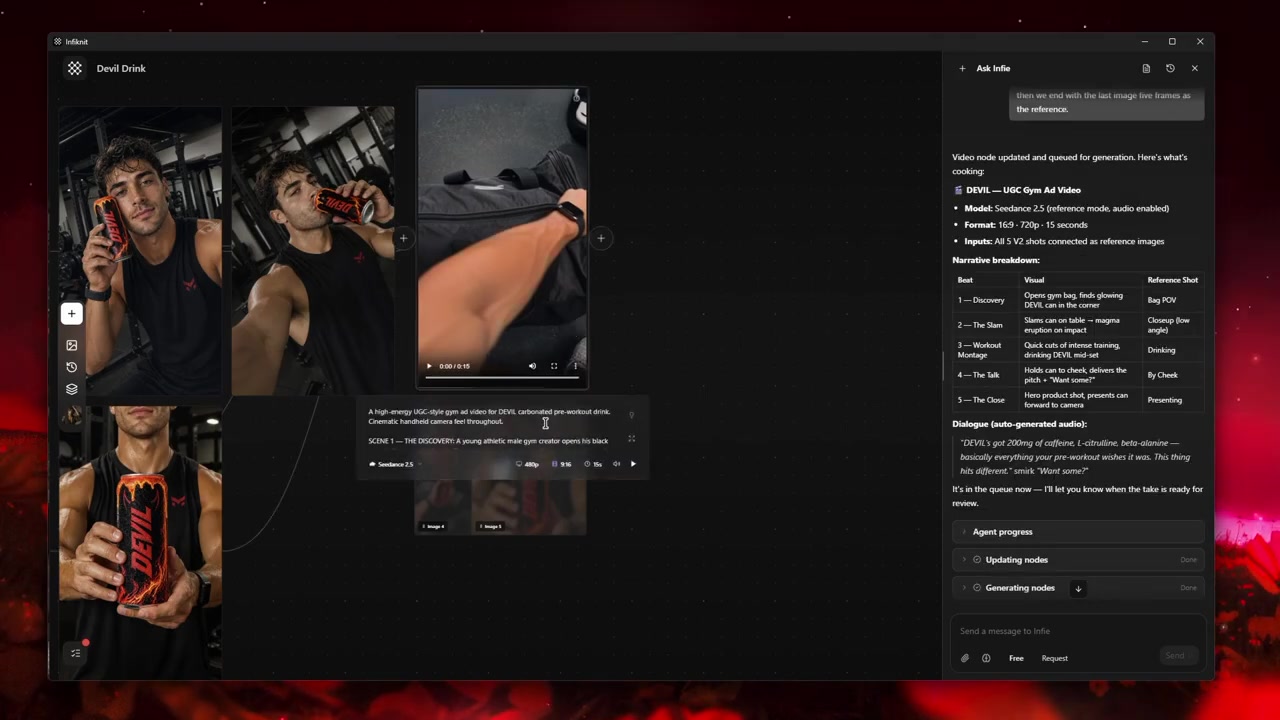
Infiknit keeps working evidence for extending video from a last frame in the canvas. Projects preserve nodes, groups, viewport state, titles, and durable media references. Generated or uploaded media can become downstream inputs. Style, Character, Product, and Background assets can return as reference nodes. Eligible Image, Video, and Video Trim nodes can run directly or through a dependency graph.
The internal agent can connect an approved still, continuation brief, and eligible video operation through validated canvas tools. It can preserve the source-to-candidate relationship and expose a clean-cut alternative, but it cannot judge the seam, alter pixels directly, or approve a shot for final edit. Keep those decisions in the review note beside the branch.
FAQ
How many nodes should AI extend video from last frame tool use?
Start with source clip → handoff frame → continuation brief → short candidate → join review. Add a long-extension or clean-cut branch only after the short candidate passes. The graph should show the handoff decision, not every scrubbed frame.
Which frame should be used to extend a scene?
Use the approved final frame only after checking subject position, camera direction, lighting, and motion. If it contains a blur, cut, or unwanted artifact, fix that source before continuing it.
How do you review an extension?
Watch the join at normal speed and inspect the first and last frames at full size. Check identity, screen direction, geometry, and lighting across the seam before accepting the longer scene.
How long should an AI video continuation be?
Start with the shortest duration that proves the next action—often one to three seconds. Add a longer branch only after the first extension has a stable join and endpoint. Short tests make drift easier to isolate and keep the original shot usable.