
Turn product images into AI product videos
Turn one approved product image into a reviewable Infiknit product video without losing geometry, claims, or source context.
 Sofia ReyesBrand & Product Editor
Turning a product image into video is a continuity problem before it is a motion problem. The still establishes the shape, label, colour, and camera relationship. The video adds one action and one ending. Infiknit keeps the source image, motion brief, candidate clips, and review decision connected on a canvas so a creator can repair the source or action without losing the accepted branch.
Consistent product video, product image to video AI, and product demonstration video share the same search job here: animate a known object while preserving the evidence a shopper needs.
Short answer: Use an approved product image as the visual anchor, then write one observable action: open, pour, rotate, place, unfold, or point. Keep the source and motion instruction as separate Infiknit canvas nodes. State what must remain fixed—shape, label, colour, controls, and scale—and what may change—background, camera distance, hand position, and pacing. Generate a short candidate first. Review the product frame by frame, check the action against the reference, and watch the final crop at the intended aspect ratio. If the product drifts, repair the reference or simplify the action. If the clip passes, connect it to captions or audio only after the visual proof is approved.
How do you turn a product image into a reliable video?
Answer in practice: Begin with the product fact the video must prove. If the goal is “show the magnetic lid closing,” the source needs a clear lid and the action needs a visible close. State what must remain fixed—silhouette, label, colour, controls, and scale—and what may change—background, camera distance, hand position, or pacing. On the canvas, use a Text node for the shot brief, an Image or Product node for the reference, and a Video node for the action. Generate a short candidate and inspect the product frame by frame, then check the crop at the intended aspect ratio. Create a second branch only for a deliberate alternative, such as a closer camera or slower movement. Name the accepted branch after the proof it contains. Add captions or audio only after the visual claim passes review.
What product-image-to-video solves
The common failure is a clip that looks polished but changes the object while it moves. A handle bends, a label shifts, or a control appears on the wrong side. Those defects are difficult to diagnose when the video is disconnected from its source. Keep the still, the intended action, and the failure note together. If the source is ambiguous, replace it. If the action is too complex, split it into two shots. If only the crop is wrong, fix the framing rather than generating a different product.
A five-question product video review
- Does the first frame match the approved product reference?
- Does the action show the feature named in the brief?
- Does the product keep its silhouette, label, colour, and controls through the motion?
- Does the final crop leave room for the approved caption or call to action?
- Does the voice or text claim only what the visual and product information support?
Run the review muted first. Then listen to the audio and read the captions at phone size. Keep the accepted clip connected to the source and review note. A short, accurate demonstration is more reusable than a longer clip that hides its continuity errors.
Separate product evidence from presentation before generating. The approved still proves silhouette, label placement, colour, controls, and proportions. The brief can change camera distance, background, hand position, pace, and crop. Keeping those lists distinct makes a polished but inaccurate animation easy to reject.
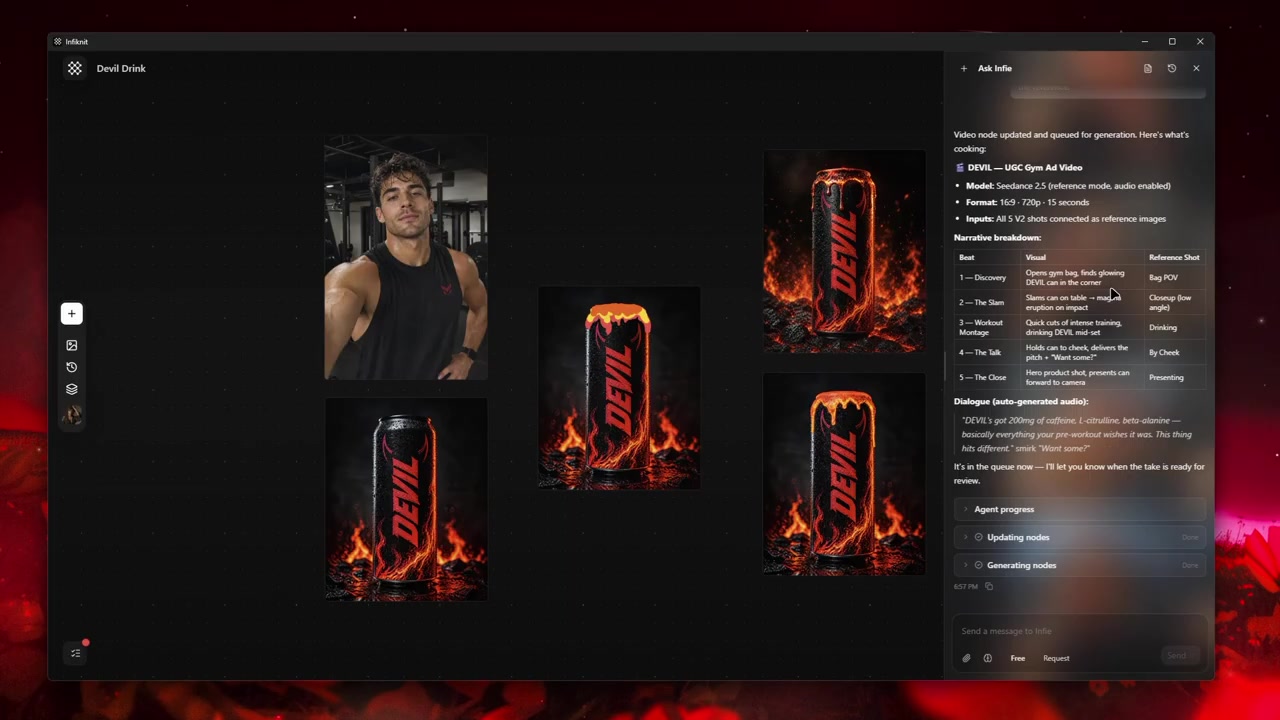
Build the smallest useful node graph
Use five responsibilities: approved product still, observable action, candidate video, frame-by-frame review, and delivery branch. Name the action after the feature it demonstrates, such as “lid closes” or “dial turns.” A reviewer should never have to infer the product claim from a cinematic adjective.
1. Audit the product still
Choose a source that shows the exact model, finish, label, controls, and angle the video will use. Mark which details are proof-critical. If the source is cropped or ambiguous, replace it before adding motion.
2. Choose one observable action
Write what the viewer should see: open, pour, rotate, unfold, plug in, or place. State what must remain fixed and where the action ends. “Make it premium” is presentation direction, not a product demonstration.
3. Generate the shortest proof
Test the action with a short candidate and a simple camera. Review the first, middle, and final frames for shape, label, controls, hands, and lighting. Fix the source or simplify the action when geometry changes.
4. Add presentation after proof
Once the action passes, branch for a vertical crop, a hand interaction, or a background change. Keep the same approved product still linked so visual alternatives do not change the object silently.
5. Approve claims and delivery crop
Watch muted first, then review captions and audio at phone size. Confirm that every spoken or written claim matches the product information. Save the accepted clip with its source still, action brief, crop, and review note.
Decisions to record before generation
| Decision | Review question | Canvas evidence |
|---|---|---|
| Product evidence | Does the still show the exact shape, label, and controls? | Approved source and proof-critical detail note. |
| Action | What feature can the viewer observe? | One action, fixed details, and endpoint in the brief. |
| Geometry review | Does the object remain accurate through the motion? | First, middle, and final-frame checks. |
| Presentation branch | Which crop, hand, light, or background alternative is being tested? | Candidate linked to the same product still. |
| Claim and crop | Does the final format support the approved caption or voice? | Muted review, phone-size check, and claim note. |
A model name alone is not a strategy. One branch may require a different input mode, duration, resolution, or reference count from another. Infiknit filters controls using enabled models and validated providers, so the current capability surface must be checked before a queue begins.
Worked example
Consider a skincare bottle whose pump must be demonstrated. Use a still with the label front-facing and write “one finger presses the pump once, one measured drop lands in the palm, bottle stays upright.” Generate a short proof with a locked camera. Only after the pump and label pass should you branch to a creator-style hand, a vertical crop, or a brighter background. If the pump changes shape, retain the source still and revise the action instead of publishing a misleading clip.
Preserve the strongest candidate as a branch. Do not overwrite the only useful output while testing another direction. When turning a product image into video, a branch is evidence: it shows which choice produced which result. Connect the approved candidate to the next media or refinement node. Save a reusable Character, Product, Style, or Background reference only after reviewing it at full size.
Review the artifact both as a final candidate and as an input. A still can look coherent in a thumbnail while hiding text or geometry problems. A video can move smoothly while changing the subject. A trim can remove the setup needed by the next shot. Queue downstream work only when both reviews pass.
Quality-control checklist
- Write the desired outcome in plain language.
- Keep the original source beside every derivative.
- Name nodes by responsibility rather than automatic ID.
- Change one major variable at a time.
- Verify model support for every connected input.
- Review product, character, text, and brand details at full size.
- Save references only after human approval.
- Record which candidate was accepted and why.
- Keep failed outputs when they explain a boundary.
- Save a Blueprint only after the graph works.
Record measurable settings such as 1080p resolution or 24 fps when the media type supports them.
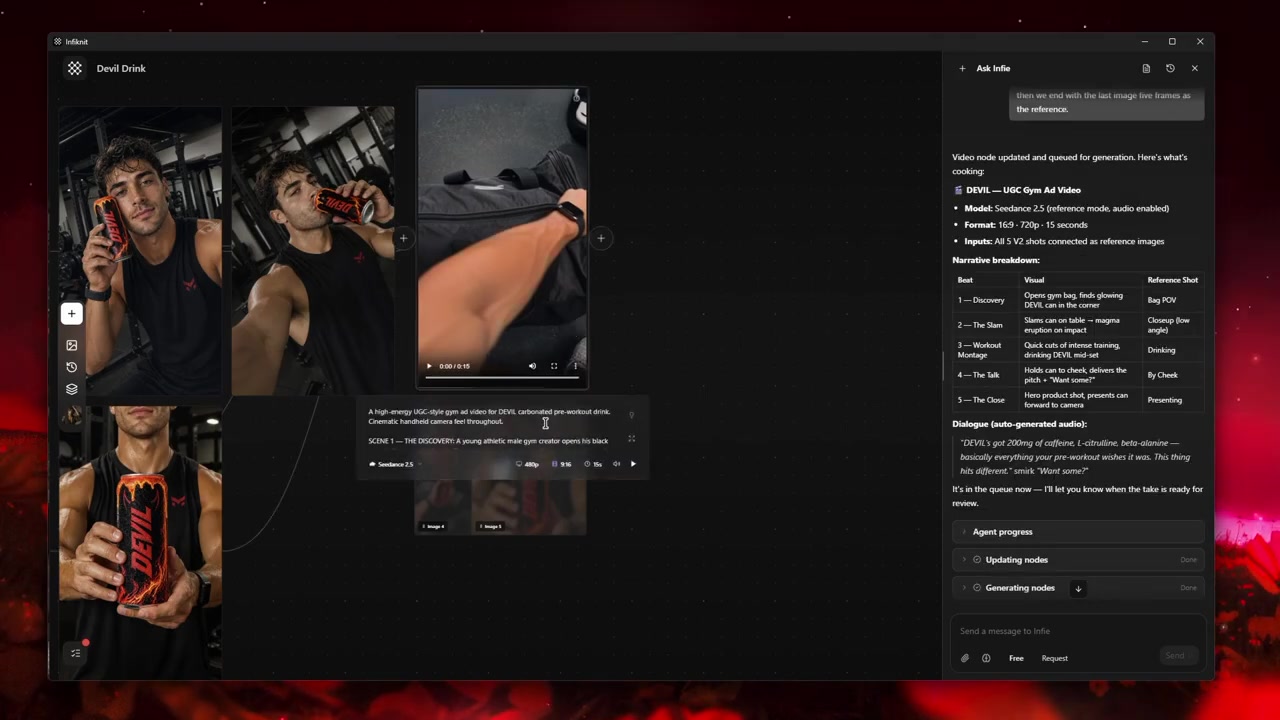
Failure modes and honest limits
Boundary 1: Small text can drift. Return to the last verified node, inspect its source and settings, and rerun only the uncertain branch. A useful process states this limit before a creator spends time or provider credits on an unsupported path.
Boundary 2: Logos require close review. Return to the last verified node, inspect its source and settings, and rerun only the uncertain branch. A useful process states this limit before a creator spends time or provider credits on an unsupported path.
Boundary 3: Geometry is not guaranteed. Return to the last verified node, inspect its source and settings, and rerun only the uncertain branch. A useful process states this limit before a creator spends time or provider credits on an unsupported path.
Boundary 4: Commercial claims need approval. Return to the last verified node, inspect its source and settings, and rerun only the uncertain branch. A useful process states this limit before a creator spends time or provider credits on an unsupported path.
How Infiknit supports the method
Infiknit keeps working evidence for AI product video from product image in the canvas. Canvas projects preserve nodes, groups, viewport state, titles, and durable media references. Generated or uploaded media can become downstream inputs. Style, Character, Product, and Background assets can return as reference nodes. Eligible Image, Video, and Video Trim nodes can run directly or through a dependency graph.
The internal agent can create, update, connect, disconnect, delete, read image nodes, and queue eligible nodes through validated frontend tools. It cannot directly edit pixels or operate Audio or Audio Trim nodes. It cannot generate a complete campaign through one broad command or synchronously wait for every provider result. Visible tool results and canvas state are the proof of completed work.
FAQ
What should a product image prove before animation?
Check that the source shows the correct product, silhouette, proportions, finish, label, and important details at the intended crop. If the source is ambiguous, motion can make an incorrect detail look intentional.
How should a product video be reviewed before export?
Watch for logo and label drift, impossible geometry, distracting camera motion, unsupported claims, and a final frame that hides the product. Keep the approved source image and review notes with the exported candidate.
Can an AI product video invent a missing product detail?
Yes. Treat every generated detail as unapproved until it matches the source still and product information. If a control, label, colour, or hand interaction changes, simplify the action or replace the reference; do not let an attractive render define the product.