
AI visual content creation for marketing campaigns
Plan Infiknit campaign images, videos, and creator concepts with sources, deliverables, formats, and reviewable decisions.
 Nia OkaforUGC & Social Editor
AI can accelerate a campaign's visual exploration, but it cannot decide what a campaign is allowed to say or what a product actually is. A useful campaign system keeps the brief, approved facts, product references, visual candidates, and reviewer decisions connected so that a new format starts from a known source instead of a guessed prompt.
Short answer: Start with a campaign promise and a source pack. Define each deliverable by its job—product still, demonstration, social clip, or creator-style concept—then branch only the decision that needs to change. Review product truth and claims before polish, and keep accepted sources beside every published asset.
Which campaign asset should be created first?
Create the asset that carries the campaign's hardest-to-prove idea. If the message depends on a product action, start with a close demonstration. If the message depends on a recognizable package or interface, start with a still at the final placement size. If the campaign is testing a visual direction, start with a reference-led image before writing a full video sequence. The first approved asset becomes evidence for the easier crops and formats; starting with a decorative hero often hides the risk until the most expensive stage.
Write the first asset's pass condition in the branch title. “Can lid opens / label stays forward / vertical” is actionable. “Launch creative” is not. This decision makes the campaign canvas useful even when the first candidate fails because the failure points to a specific input or shot choice.
Turn a campaign brief into a set of visual jobs
“Make campaign content” is too broad to guide a canvas. List the assets the campaign actually needs and the question each one must answer. A product-page hero, a paid-social video, an organic carousel, and a creator-style concept can share product material while having different proof, crop, and copy requirements.
| Deliverable | Viewer job | Stable inputs | Variable inputs |
|---|---|---|---|
| Product still | identify the product quickly | pack shot, logo, colour, feature facts | background, framing, prop |
| Demonstration | see an action or feature | product geometry, approved claim | camera, hands, sequence |
| Short social clip | understand one message quickly | proof moment, product reference | opening, caption, edit length |
| Creator-style concept | see product in a lived-in context | product and approved script facts | setting, pacing, presentation |
This table is a planning device, not a promise that one model or provider will make every asset. It tells the team which decision is shared and which one belongs to a specific placement.
Establish a campaign source pack
The source pack should be a small, reviewable collection—not an unlabelled drive of inspiration. Include the current product references, brand rules, approved claims, audience context, delivery formats, and any creative boundaries. If a product changes, create a new source version rather than leaving a reviewer to guess whether an old image is still valid.
Separate references by responsibility. A product image protects product identity. A style sample expresses lighting or art direction. A framing reference explains composition. A claim sheet limits copy. That separation makes revisions safer: the campaign can request a new background without accidentally accepting a new label or feature.
For a product-specific system, read building an AI brand visual consistency system. For reusable files and references across multiple campaigns, use organising a reusable AI creative asset library.
Build the campaign in branches, not a single chain
Create one branch per deliverable and name it by its purpose. “Product close-up / landscape / launch page” and “Bag demonstration / vertical / paid social” are inspectable names. Each branch should point back to its product source and brief, then contain only the inputs needed for that output.
Branches are particularly valuable when the campaign needs several formats. Do not resize a landscape product image blindly and call the result a vertical ad. A vertical opening often needs different product placement, text-safe space, and a different proof crop. Treat the crop as a creative decision with its own review condition.
The same principle applies to variants. If only the hook changes, preserve the approved proof. If the product, person, setting, and claim all change, record it as a new concept. UGC ad hooks and variations explains how to keep those comparisons meaningful.
Use product evidence where it helps
An Infiknit product-video example demonstrates a product-led sequence for a pre-workout ad: a can design is refined, five candidate images are inspected, selected framing and product references are used for a later image pass, and the selected stills move into a video node. It is useful because the sequence shows the product source, candidate review, framing changes, and the handoff into motion in one project.
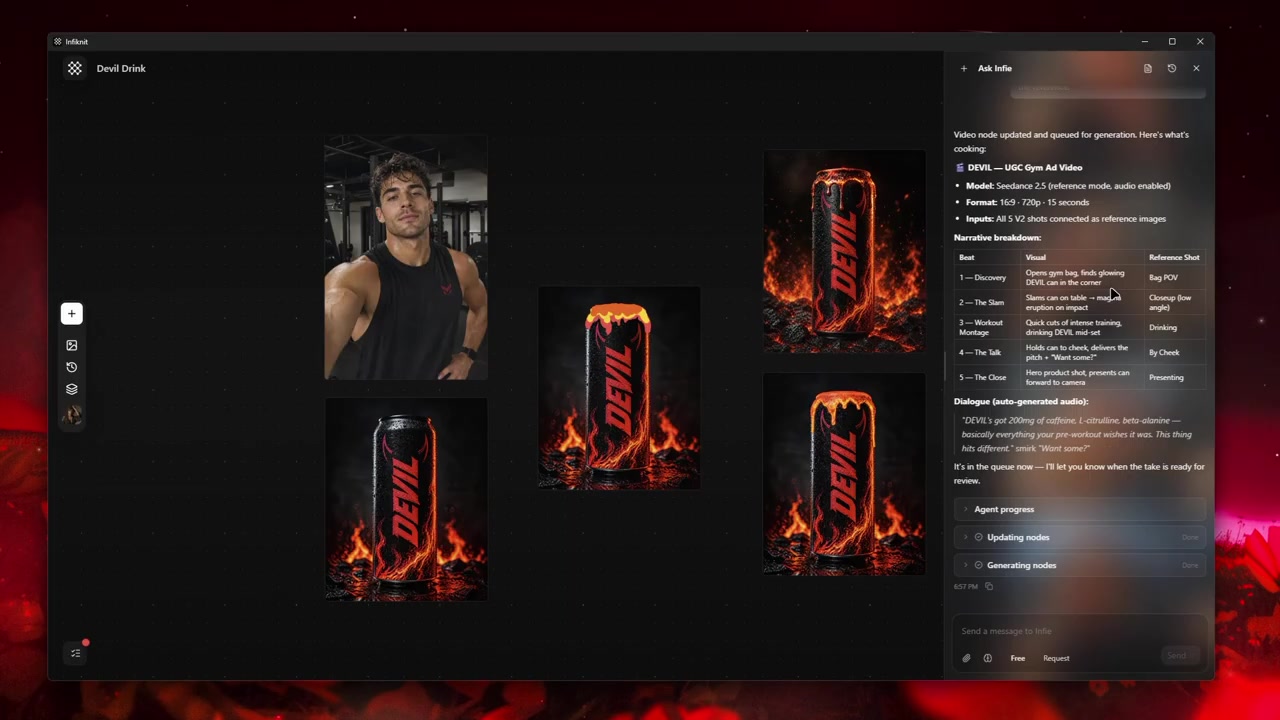
The source product, candidate images, and review context remain visible together.
Use that evidence where the campaign needs a product-image-to-video example. The full process lives in Create UGC-style product videos with AI. Do not paste the same case study into every campaign page: a still-image campaign, an audio project, and a product demo have different evidence requirements.
Review in the order that protects the campaign
Start review with the expensive errors:
- Is the product or subject accurately represented?
- Does the claim match the approved claim sheet?
- Can the placement show the essential detail at its actual size?
- Is any person presented truthfully?
- Does the image or clip have a concrete job in the campaign?
Only then review mood, polish, and novelty. A striking image with the wrong product silhouette is not a campaign asset. A creator-style concept should remain tied to the approved product action and source note; it should not be used as evidence for a result the visual does not show. Keep the claim decision in the campaign branch so each format inherits the same approved fact rather than a longer disclaimer.
How should campaign variants be compared?
Hold the source pack, product facts, destination, and proof moment constant. Change one deliberate variable—opening frame, camera distance, background, crop, caption, or pace—and name it in the branch. Review candidates at the size and sound conditions of the placement. A variation is informative when the team can answer “what changed?” and “what passed?” without opening an unrelated export folder.
Create a delivery-specific handoff
The final output needs more than an exported image or video. Each selected asset should carry its source version, crop, destination, approved copy, and review outcome. For video, add the chosen frame or image reference, caption file, audio status, and the exact point where the proof is visible.
Destination specifications evolve. Check the current requirements in the actual delivery platform before exporting; for example, YouTube's upload guidance is more reliable than a format value carried forward from an old campaign board.
If the campaign is primarily social, continue with creating social media images and videos with AI. If it needs a product demonstration, start with creating a UGC product demo from a product image.
Know what the canvas does not decide
Infiknit connects references, image/video nodes, provider access, and reviewable branches. It does not certify claims, publish to every social network, decide media rights, or prove performance. Keep those responsibilities with the person or system that owns them.
This distinction protects the campaign from inflated workflow language. The purpose of the canvas is not to make marketing automatic; it is to make the visual reasoning visible enough to review, reuse, and revise.
Plan a revision path before launch
Campaigns change after the first asset is approved: a new offer appears, a placement needs a different crop, a product detail changes, or a reviewer finds an unsupported implication. Build the revision path into the project by preserving the approved source, naming the decision that changed, and keeping the previous branch intact. That lets a campaign team compare an intentional update with the prior version instead of treating a fresh output as the same creative.
The handoff should also identify what cannot be reused. A social crop cannot automatically inherit the claim placement of a landing-page visual. A creator-style concept cannot inherit the proof of the product demonstration that inspired it. A product source from an old version cannot be silently carried into a current campaign. These distinctions are mundane, but they are the difference between a reusable system and a folder of attractive, untraceable assets.
For product-specific branches, use create reusable brand backgrounds and references and generate image variations from reference images. Keep any performance statement beside the source and evidence that support it; a polished variation is not a substitute for that review.
Keep campaign measurement separate from creative production
The canvas can preserve what was made and why. It does not make a causal performance conclusion. When a campaign is delivered, collect the results from the delivery platform with the placement, audience, date range, budget condition, and exact asset version. Those details matter because a change in distribution can look like a change in creative quality.
Bring the conclusion back to the branch as a hypothesis, not a verdict. A product-first opening may be worth testing again in a comparable placement; it is not automatically the correct answer for a different product, channel, or audience. This makes creative iteration more honest and protects the team from optimising the next campaign against a result it cannot interpret.
It also keeps ownership clear. The campaign manager owns the decision to test and distribute. The product owner owns factual accuracy. The creative team owns whether the selected branch still represents the agreed message. Infiknit keeps those decisions connected to the visual materials; it does not replace the people accountable for them.
Campaign review checklist
- The campaign promise is written in one sentence.
- Every asset has a named delivery job.
- Product references and approved claims are versioned.
- Each branch changes a deliberate variable.
- The product and visible proof survive review at delivery size.
- Creator-style material is labelled by its production role and stays tied to the approved product action.
- The final asset links back to its source and approval note.