
Create social media images and videos with AI
Plan Infiknit social images and short videos with audience intent, source references, framing, and reviewable branches for channel-ready content.
 Nia OkaforUGC & Social Editor
Social content is a family of placements, not one generic “creative.” A feed image has to make sense at thumbnail size. A short video needs a visible reason to keep watching. A carousel or sequence needs each frame to earn the next. AI is most useful when the team has already decided what the asset must communicate and can inspect every source that shaped it.
Short answer: Choose one audience action for each post—stop, understand, save, click, or share—then create the image or video around a single visible idea. Keep the product source, hook, proof, crop, caption, and review decision connected in Infiknit so a new social format begins from approved material.
Which social asset should be made first?
Start with the placement where the campaign's proof is hardest to show. For a product action, make a close still or short demonstration before exploring decorative hooks. For a lesson or announcement, make the image that communicates the idea at thumbnail size. For an on-camera clip, start from the real source frame and write the first spoken or captioned idea beside it. The first asset sets the reference and review condition for the easier crops.
Give every post one job
The campaign brief may contain several messages, but one social post needs a primary job. Write it before making an image prompt or a video node.
| Post job | What the viewer should get | Best evidence |
|---|---|---|
| Recognition | what the product or idea is | distinct subject, clean label or title |
| Demonstration | how one action works | visible product action or interface state |
| Consideration | why a feature matters | specific comparison, detail, or use context |
| Save/share | what is worth returning to | useful checklist, concept, or compact lesson |
| Click | what the next step is | clear offer or resource, consistent with destination |
Do not combine all five jobs because the project has room for more copy. A strong social asset is selective. If a post needs a product demo, make the proof the centre. If it needs a campaign idea, make the visual hierarchy serve that one idea.
Choose the source before the style
For product-led content, begin with the approved product source. For an on-camera lesson, begin with the real screen or product evidence. For a concept, label it internally as a concept and keep it separate from product claims. Style references come after those sources, not before them.
This keeps a social variation from accidentally changing the product while it changes lighting, background, or framing. Create consistent AI product photography covers the product-reference problem in more depth. Build reusable AI creative blueprints is useful when the same source pack must support a recurring series.
Design images for the moment they are seen
Review a social image at the size and crop where it will appear. The subject should remain recognisable. Text should be readable without asking the viewer to zoom. A product detail should not be hidden by the caption area. If the visual only works in a full-screen preview, it needs a different composition for the feed.
Create a separate branch for each meaningful aspect ratio. Do not treat a vertical crop as an export setting applied to a landscape creative. The crop changes the order in which the viewer discovers the product, the face, the caption, and the proof. Record the placement alongside the branch so a reviewer knows what the image was designed to do.
Platform details change. Check the current requirements in the destination's official documentation before final delivery rather than copying a specification from a prior campaign; YouTube's upload guidance is one example of a source to consult for a YouTube placement.
Build short social video around a visible proof
For a video, start with the action or detail that would still make sense if the viewer hears no audio. A product opening, a material close-up, a before-and-after interface state, or a direct comparison can carry the first useful moment. The spoken hook and caption should clarify that proof, not replace it.
An Infiknit product-video recording shows this approach on a pre-workout concept: the project creates a product reference, evaluates several image candidates, rejects weak hand and framing results, and moves selected stills into a video branch. The complete account belongs in Create UGC-style product videos with AI. Its relevant lesson for social teams is narrower: review a product-led still before it becomes motion.
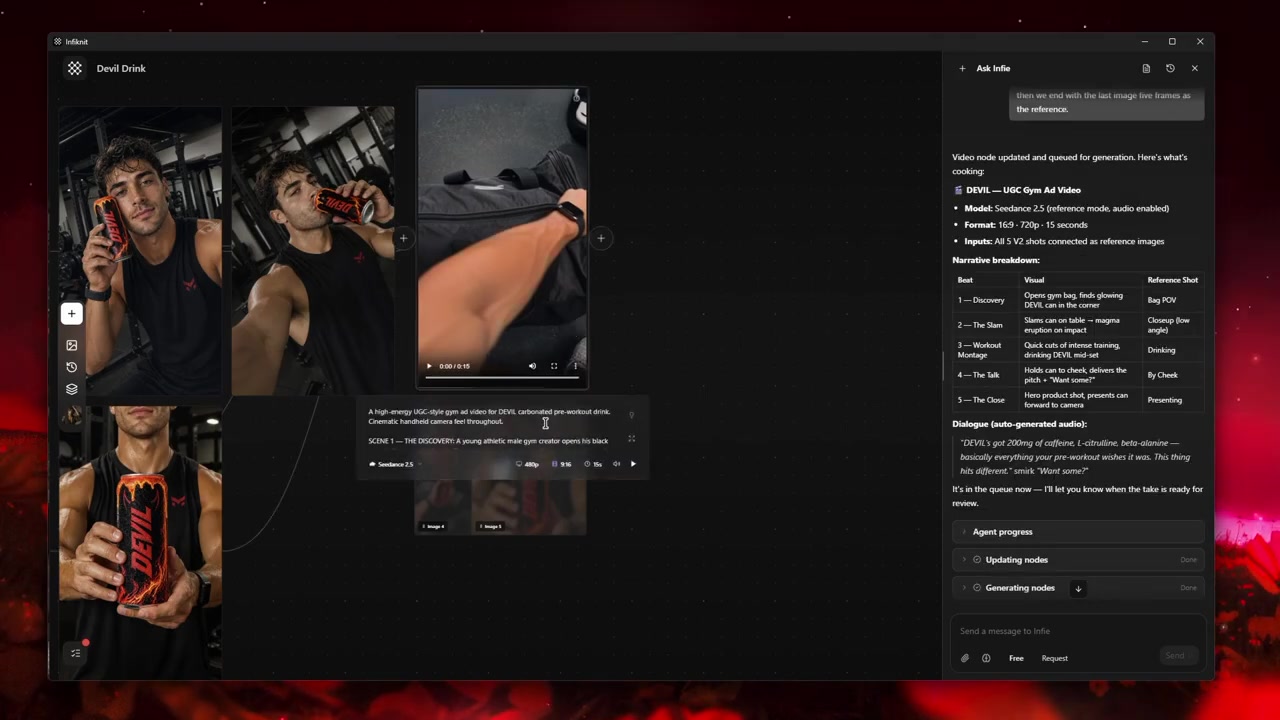
Selected product-motion frame before a social cut is delivered.
For a three-beat product sequence, use storyboarding UGC video before generation. If the opening needs controlled alternatives while the proof remains fixed, use UGC ad hooks and variations.
Keep image and video decisions separate
An image branch needs an approved source, intended crop, visual message, and review note. A video branch also needs a motion instruction, end point, audio/caption plan, and a decision about whether the action is physically credible. Joining them too early creates avoidable confusion: a strong still may not be a usable opening, and a good opening may still need a different proof frame.
Use an approved still as the source for motion when identity matters. Describe a single action—turn, lift, place, open, point—rather than asking the video generator to invent a full sequence. Create AI video from reference images explains how to retain that source relationship. If the still has one local defect, use editing with references and masks before throwing away the whole branch.
How should creator-style social content be scoped?
Creator-style framing, direct address, and informal pacing are presentation choices. Write the on-camera role, product action, source frame, and closing state into the brief so the viewer can follow what is being demonstrated. For an existing recording, keep the original video or timestamp attached to the branch; if the post is a concept, keep the concept note separate from product facts. The visual style can change while the approved source and visible proof remain stable.
Review before publishing, then learn from delivery
Review each selected post in its intended placement:
- Can someone identify the subject in the first glance?
- Is the product, logo, interface, or claim still accurate?
- Does the hook lead into a visible proof moment?
- Is text readable and does it match the approved claim sheet?
- Does the on-camera role and product action match the source note?
- Can the team trace the output back to its reference and review note?
Once published, performance belongs to the channel. Save delivery context with the creative branch—placement, audience, timing, and exact version—before drawing conclusions. A higher view count alone does not prove that one visual decision caused the result.
A practical social content map
One product idea can become a small, coherent set without duplicating the same asset:
- A product-led feed image that establishes recognition.
- A close-up detail image that supports consideration.
- A short proof video built from an approved still.
- A creator-style concept that leads to the same proof.
- A saveable post that explains the decision or process.
Each asset should carry a different viewer job while tracing back to the same approved source pack. This is the practical connection between social production and AI visual content creation for marketing campaigns.
Build a social review loop that stays small
The review loop should answer a different question at each stage. First, check source accuracy: is this the approved product, screen, or recorded material? Second, check comprehension: can the viewer identify the subject and the proof at the intended crop? Third, check publication context: do caption, music, disclosure, and destination link say the same thing as the visual?
Keep rejected versions. A rejected crop can reveal that a safe area is wrong; an abandoned hook can show that the proof arrived too late. The point is not to save every experiment forever. It is to preserve enough evidence that the next social version is an intentional change, not another anonymous export.
For sequential content from one approved source, see turn a storyboard into consistent AI video scenes and continue and extend an AI video scene. For paid social claims, keep the approved claim, source frame, and destination copy together before publishing.
Use a source-to-post naming convention
Give the branch a name that says what it contains and where it is intended to appear: “approved-product / detail-close-up / portrait-feed” communicates far more than “final2.” Add the date and source version in the project record, not in visible consumer-facing copy. This makes review faster when a current product pack shot replaces an older one.
For video, name the proof as well as the hook: “cap-close / direct-open / vertical” lets a teammate find every version built from the same action. That is valuable when a post needs a new caption or crop months later. The team can locate the stable evidence first instead of reproducing a visual from memory or using an export whose source is unknown.
The naming is deliberately operational rather than consumer-facing. It helps the team locate approvals, source material, and the creative question under test without asking the file name to make a marketing claim. That is particularly helpful once several placements and campaign dates share the same product reference.
How should a social variation be approved?
Approve it in three passes: source, comprehension, and delivery. First compare the product, interface, or recorded source with the selected branch. Then view the post at its real crop and ask whether the viewer can identify the subject and proof without extra explanation. Finally check caption, audio, destination, and format together. Record one accepted decision and one repair note; a general “looks good” does not tell the next creator what must stay fixed.